Skip Navigation

UConn Bound Days

An aerial view of Wilbur Cross among blooming trees

One of the best ways to decide whether a school is the right fit is to experience it for yourself.

Admitted students are invited to join us at our main campus in Storrs for UConn Bound Days, an open house opportunity designed to highlight the very best UConn has to offer. From faculty-led academic sessions and admissions presentations to campus tours and more, come discover what makes UConn one of the nation’s top public universities.

UConn Bound Days are available at all five UConn campuses.

Blue and purple flowers sit in the flowerbed in front of the UConn gateway sign along Route 195

UConn Storrs (Main Campus)

Saturday, March 28, 2026
Sunday, April 12, 2026

Regional Campuses

Avery point campus shot on a drone circling the coast and showcasing the lighthouse and a few surrounding buildings

UConn Avery Point

Saturday, April 11, 2026

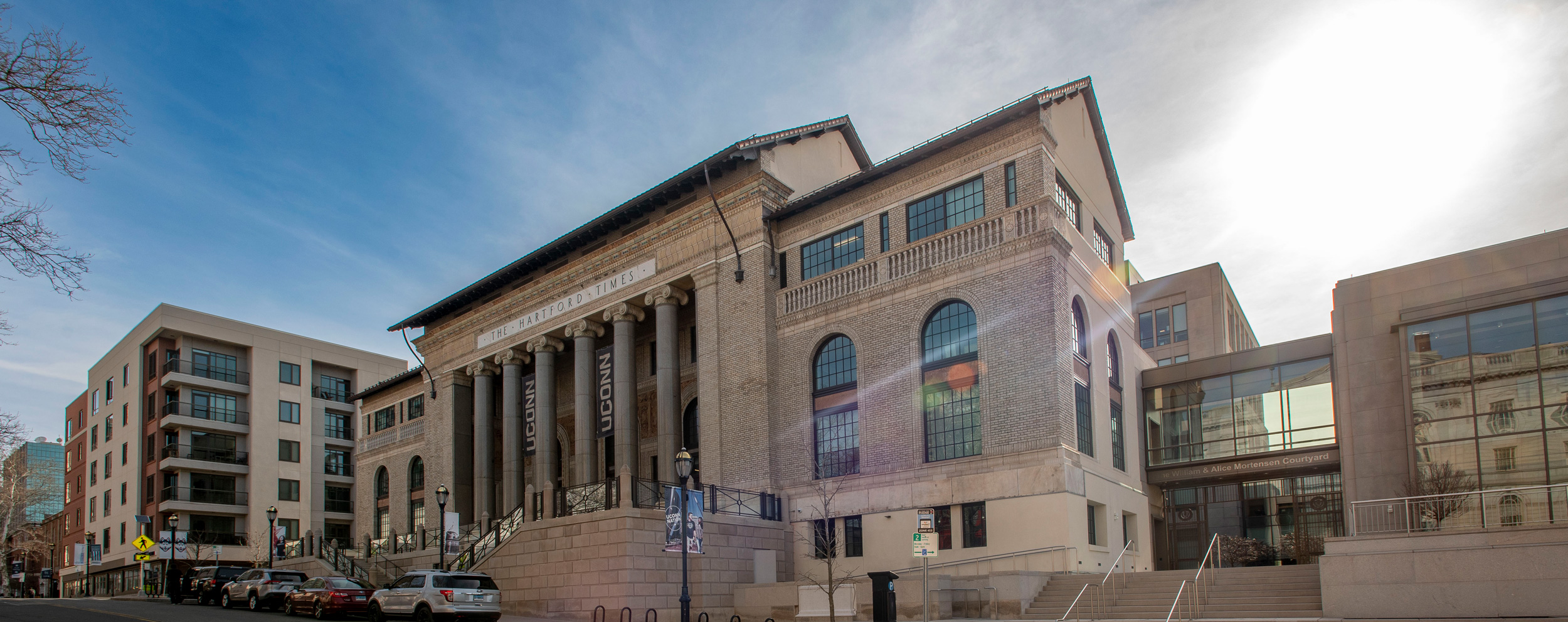
Font view of the UConn Times Building

UConn Hartford

Saturday, April 18, 2026

UConn Stamford campus at night

UConn Stamford

Saturday, March 28, 2026,
Saturday, April 11, 2026,
& Saturday, April 18, 2026

UConn Waterbury

UConn Waterbury

Sunday, April 19, 2026


UConn Bound Day at a Glance

Our flexible presentation and tour schedule is designed to help you get the most out of your visit to the Storrs main campus.

9:00 a.m. – 9:30 a.m.Campus Welcome
Jorgensen Center for the Performing Arts
How Major Is Your Major?
Academic Center for Exploratory Students
McHugh Hall, Room 102
Navigating Your First Year
Student Union Theatre
9:00 a.m. – 3:00 p.m.Campus Tours
60-minute tours depart from the Homer Babbidge Library
Student Recreation Center Tours
Student Recreation Center, Hillside Road Entrance
10:00 a.m. – 10:30 a.m.Navigating Your First Year
Jorgensen Center for the Performing Arts
Pre-Medical & Pre-Dental Advising
Austin Building, Room 108
10:00 a.m. – 12:30 p.m.School and College Presentations
(see printed program provided at the event for session times and locations)
11:00 a.m. – 11:30 a.m.How Major Is Your Major? Academic Center for Exploratory Students
Jorgensen Center for the Performing Arts
Pre-Law Advising
Austin Building, Room 108
11:00 a.m. – 2:00 p.m.Learning Community Showcase
Peter J. Werth Residence Tower
11:30 a.m. – 2:30 p.m. UConn Innovation Zone Tours
Peter J. Werth Residence Tower, Room 014
12:00 p.m. – 12:30 p.m.Financing Your UConn Education
Student Union Theatre
Huskies Forever:
A Conversation with UConn Alumni
Dodd Center, Konover Auditorium
Pre-Medical & Pre-Dental Advising
Austin Building, Room 108
12:00 p.m. – 2:00 p.m.Cultural Centers & Programs
Student Union, Fourth and First Floor
12:00 p.m. – 2:30 p.m.Campus Connections Expo
Student Union Ballroom
1:00 p.m. – 1:30 p.m.Beyond the Classroom: Undergraduate Research at UConn
Jorgensen Center for the Performing Arts
Career Readiness
Student Union Theatre
Transfer Admissions
Student Union, Room 310
2:00 p.m. – 2:30 p.m.Financing Your UConn Education
Student Union Theatre
Living on Campus
Jorgensen Center for the Performing Arts

Please note: Times and locations of the sessions above are subject to change. For the safety of all, bags and backpacks larger than 10″x10″ are prohibited from sessions in the Jorgensen Center for Performing Arts. Exceptions for medically necessary items may be made after proper inspection. Small bags and purses are permitted but are subject to search.

Our websites may use cookies to personalize and enhance your experience. By continuing without changing your cookie settings, you agree to this collection. For more information, please see our University Websites Privacy Notice.

What are cookies?

Web cookies (also called HTTP cookies, browser cookies, or simply cookies) are small pieces of data that websites store on your device (computer, phone, etc.) through your web browser. They are used to remember information about you and your interactions with the site.

Purpose of Cookies:

  1. Session Management:

    • Keeping you logged in
    • Remembering items in a shopping cart
    • Saving language or theme preferences
  2. Personalization:

    • Tailoring content or ads based on your previous activity
  3. Tracking & Analytics:

    • Monitoring browsing behavior for analytics or marketing purposes

Types of Cookies:

  1. Session Cookies:

    • Temporary; deleted when you close your browser
    • Used for things like keeping you logged in during a single session
  2. Persistent Cookies:

    • Stored on your device until they expire or are manually deleted
    • Used for remembering login credentials, settings, etc.
  3. First-Party Cookies:

    • Set by the website you're visiting directly
  4. Third-Party Cookies:

    • Set by other domains (usually advertisers) embedded in the website
    • Commonly used for tracking across multiple sites
Authentication Cookies

Authentication cookies are a special type of web cookie used to identify and verify a user after they log in to a website or web application.


What They Do:

Once you log in to a site, the server creates an authentication cookie and sends it to your browser. This cookie:

  • Proves to the website that you're logged in
  • Prevents you from having to log in again on every page you visit
  • Can persist across sessions if you select "Remember me"

What's Inside an Authentication cookie?

Typically, it contains:

  • A unique session ID (not your actual password)
  • Optional metadata (e.g., expiration time, security flags)
Analytics Cookies

Analytics cookies are cookies used to collect data about how visitors interact with a website. Their primary purpose is to help website owners understand and improve user experience by analyzing things like:

  • How users navigate the site
  • Which pages are most/least visited
  • How long users stay on each page
  • What device, browser, or location the user is from

What They Track:

Some examples of data analytics cookies may collect:

  • Page views and time spent on pages
  • Click paths (how users move from page to page)
  • Bounce rate (users who leave without interacting)
  • User demographics (location, language, device)
  • Referring websites (how users arrived at the site)
Opt Out

Here's how you can disable cookies in common browsers:

1. Google Chrome

  • Open Chrome and click the three vertical dots in the top-right corner.
  • Go to Settings > Privacy and security > cookies and other site data.
  • Choose your preferred option:
    • Block all cookies (not recommended, can break most websites).
    • Block third-party cookies (can block ads and tracking cookies).

2. Mozilla Firefox

  • Open Firefox and click the three horizontal lines in the top-right corner.
  • Go to Settings > Privacy & Security.
  • Under the Enhanced Tracking Protection section, choose Strict to block most cookies or Custom to manually choose which cookies to block.

3. Safari

  • Open Safari and click Safari in the top-left corner of the screen.
  • Go to Preferences > Privacy.
  • Check Block all cookies to stop all cookies, or select options to block third-party cookies.

4. Microsoft Edge

  • Open Edge and click the three horizontal dots in the top-right corner.
  • Go to Settings > Privacy, search, and services > cookies and site permissions.
  • Select your cookie settings from there, including blocking all cookies or blocking third-party cookies.

5. On Mobile (iOS/Android)

  • For Safari on iOS: Go to Settings > Safari > Privacy & Security > Block All cookies.
  • For Chrome on Android: Open the app, tap the three dots, go to Settings > Privacy and security > cookies.

Be Aware:

Disabling cookies can make your online experience more difficult. Some websites may not load properly, or you may be logged out frequently. Also, certain features may not work as expected.